 Michael Cambridge
Press the Start Game button to start the game
Game Description
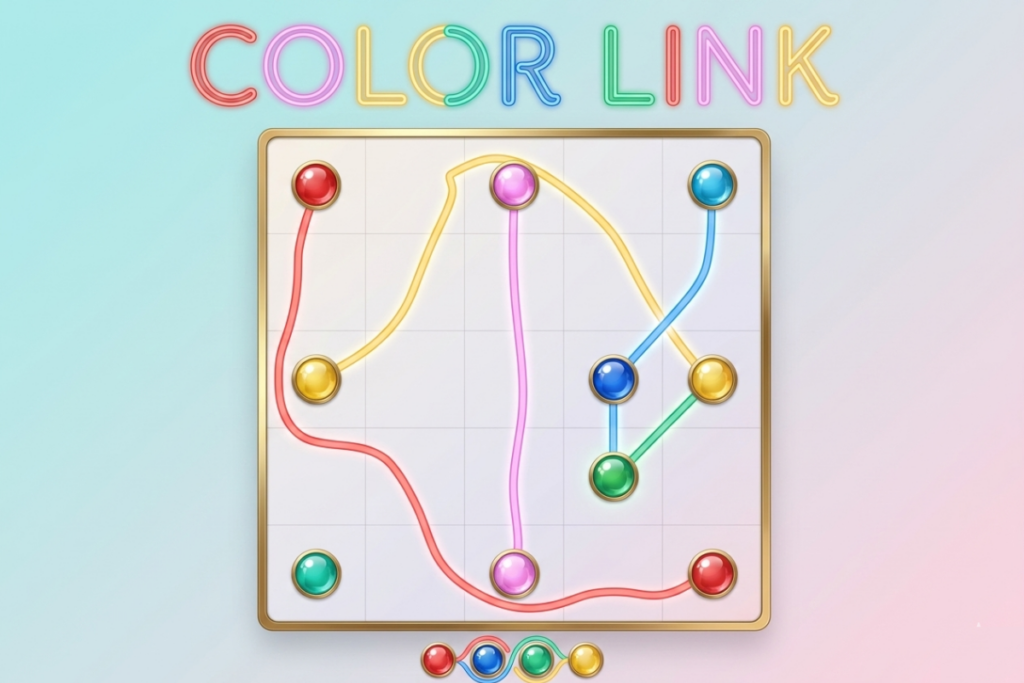
Color Link is a vibrant, minimalist puzzle game that challenges your spatial awareness, logic, and planning skills. The game presents players with a clean grid filled with pairs of colorful dots. Your task is simple yet deeply engaging: connect matching colors by drawing lines between them.
However, there is a catch—lines cannot cross or overlap one another. As the grid size scales from a cozy 4×4 up to a massive 8×8 with 8 distinct colors, you will need to weave, loop, and plan your paths perfectly to ensure every color finds its match without a single collision.
Mission Briefing
🚀 Attention, Intellect: Your mission is to establish clean data pipelines across an increasingly complex network grid. The system is jammed, and signals are crossing paths. You are tasked with connecting matching color nodes across 50 custom and procedurally generated hard levels.
Intersecting paths will immediately blow the fuse and reset the connection. Exercise precision, map out your routes mentally, and link the colors to restore system harmony. Good luck.
Objective
The core objective of Color Link is to successfully connect every pair of matching colored dots on the grid by drawing a continuous path between them.
- Win Condition: All pairs of colors must be simultaneously connected to their matching halves.
- Fail Condition: If your active line collides with or crosses any existing line belonging to a different color, the line snaps, and the path resets.
Game Controls
💻 Desktop Controls
- Draw a Line: Hover your mouse cursor over any colored dot, click and hold the Left Mouse Button (LMB), and drag your cursor across the grid toward the matching dot.
- Complete a Link: Release the mouse button once your line touches the target matching dot.
- UI Navigation: Use standard mouse clicks to navigate menus, select levels, restart levels (
↻), pause (❚❚), or access settings (⚙️).
📱 Mobile Controls
- Draw a Line: Tap and hold your finger down on a colored dot, then drag your finger smoothly across the screen to trace a path.
- Complete a Link: Lift your finger off the screen once your line reaches the matching colored dot.
- UI Navigation: Simple finger taps interact with all screen menus, settings, and level select grids.
Tips & Strategy
- Work from the Outside In: Start by linking dots that sit along the outer edges of the grid. Wrapping your lines around the perimeter preserves the valuable open space in the middle for more complicated, central connections.
- Visualize the Maze: Before you touch the screen, take a few seconds to look at the grid as a whole. Try to spot which colors are blocking each other and predict where the loops will need to happen.
- Clear the Path: If you find yourself completely stuck or cornered by an early line you drew, hit the Restart Level (↻) button to instantly clear the canvas and try a completely fresh approach.
- Take It Slow: The game code does not penalize you for time or line length! Precision is everything. Dragging too fast can cause accidental collisions that reset your hard work.
Key Features
- Adaptive Difficulty Scale: Learn the ropes on streamlined 4×4 and 5×5 setups (Levels 1–4) before advancing to Level 5+ Hard Mode, featuring massive 8×8 grids with up to 8 challenging color variations.
- Procedural Hard Mode Engine: Levels 5 through 50 utilize a dynamic placement algorithm that actively enforces distance between matching dots, guaranteeing an unpredictable and brain-melting puzzle experience every time.
- Sleek User Interface: A minimalist canvas grid backed by a playful typographic styling (
Fredoka OneandPatrick Handweb fonts) paired with smooth CSS background gradients. - Fully Responsive HTML5 Architecture: Engineered utilizing unified pointer events and dynamic canvas resizing, delivering an equally seamless gameplay layout across widescreen desktop monitors, tablets, and smartphones.
- Generative Audio Experience: Features a built-in synthesized Audio Context manager that generates a looping harmonic soundtrack and satisfying victory chimes directly through code—no heavy audio file downloads required.


GIPHY App Key not set. Please check settings